Complete Book Formatting Guide for Self-Publishing (eBook & Paperback)
Professional book formatting made simple for self-publishers.


Words by
Rehmat Amjad
Finishing your manuscript feels like reaching the finish line.
Then you discover, writing the book was only half the journey.
Now you're faced with unfamiliar terms like trim size, bleed, EPUB, gutters, print ready PDFs, and embedded fonts. Suddenly, publishing feels more technical than creative.
The good news? It doesn't have to be.
Book formatting isn't about memorizing complicated rules, it's about following a proven process that makes your book look professional, read beautifully, and meet the requirements of platforms like Amazon KDP and IngramSpark.
This guide walks you through everything you need to know, from preparing your manuscript to creating publication ready eBooks and paperbacks. Whether you're formatting your first book or your tenth, you'll learn the fundamentals that help every great story look as polished as it deserves.
Why book formatting is often overlooked
Great formatting is invisible.
When a book is formatted well, readers don't notice the margins, fonts, or spacing; they simply get lost in the story.
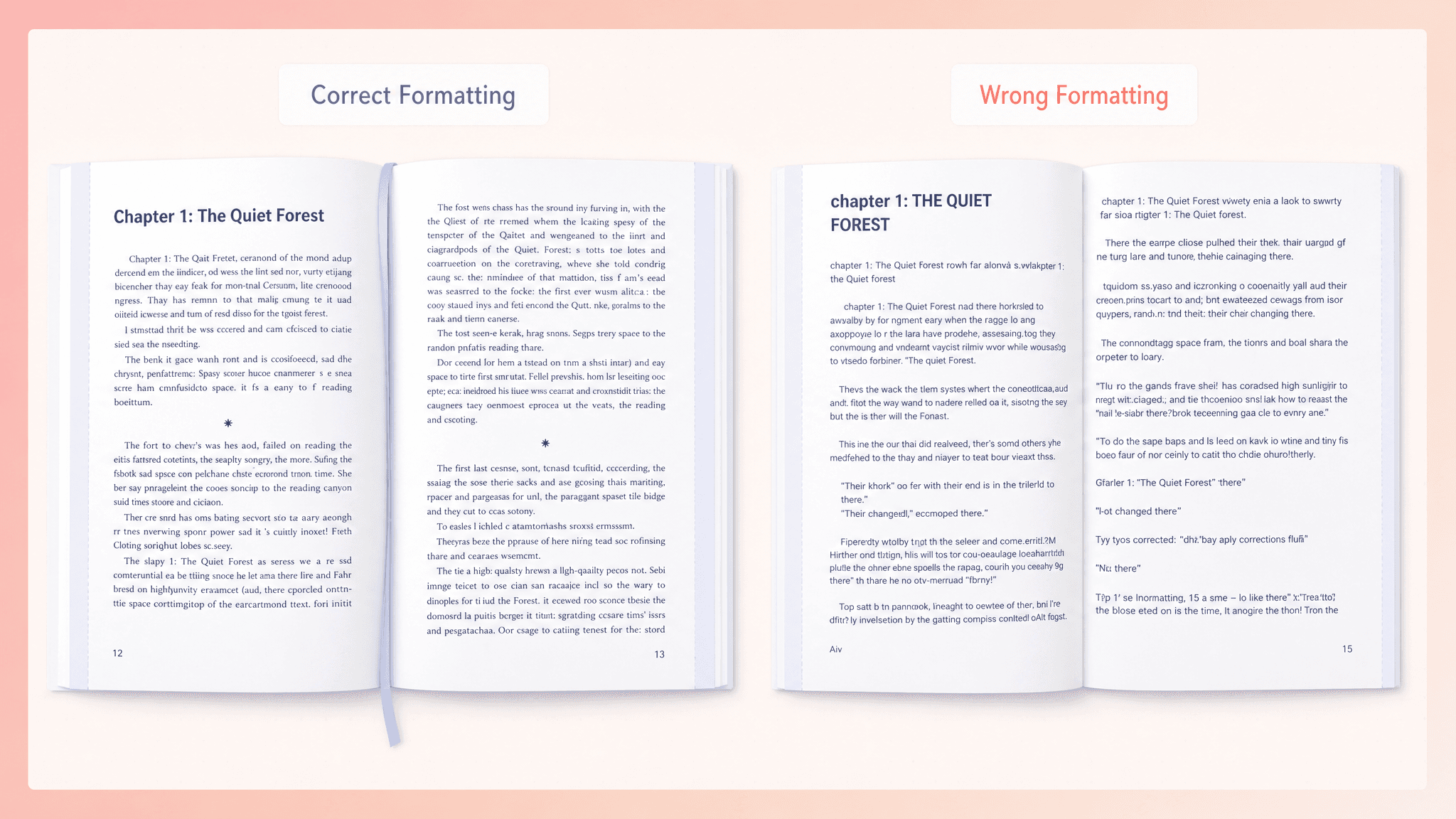
Poor formatting is impossible to ignore. Broken chapter headings, awkward spacing, missing links, crowded pages, or images that shift out of place can instantly make even great writing feel unpolished.
That's why formatting isn't just the final step before publishing. It's part of the reading experience. A professionally formatted book builds trust, keeps readers engaged, and lets your words take center stage, not formatting mistakes,
5 things every author should know first
Before you start adjusting fonts and margins, it helps to understand a few basics. These five ideas will save you time and a lot of frustration.
1. Formatting isn't editing
Editing improves your writing. Formatting prepares it for readers. It organizes your text, chapters, spacing, and layout so your book looks polished and is ready to publish.
2. eBooks and paperbacks need different files
One format doesn't fit all. An eBook needs to adapt to different screen sizes, while a paperback has a fixed layout that never changes. That's why each version needs its own formatting.
3. eBooks change with the reader
Readers can increase font size, switch to dark mode, or read on a phone, tablet, or Kindle. Your formatting has to work no matter how they choose to read.
4. Printed books cannot change
Once a paperback is printed, every page is permanent. Margins, page breaks, images, and spacing all need to be correct before your book goes to print.
5. Every publishing platform has rules
Whether you're publishing on Amazon KDP or IngramSpark, every platform checks your files against its formatting requirements. Meeting those standards helps your book get approved and look professional from day one.
What book formatting actually means
Think of publishing as three simple steps:
Write — Create your manuscript.
Edit — Improve your writing.
Format — Turn it into a book readers can actually enjoy.
Formatting is the bridge between a finished manuscript and a published book. When it's done well, readers never notice it, they simply enjoy the experience. When it's done poorly, even great writing can feel unprofessional.
That's why good formatting isn't just about appearance. It's what makes your book feel like a real book.
The four building blocks of a professionally formatted book
Think of book formatting like building a house. If the foundation is weak, even the best story can feel unfinished.
Every professionally formatted book is built on these four essentials.
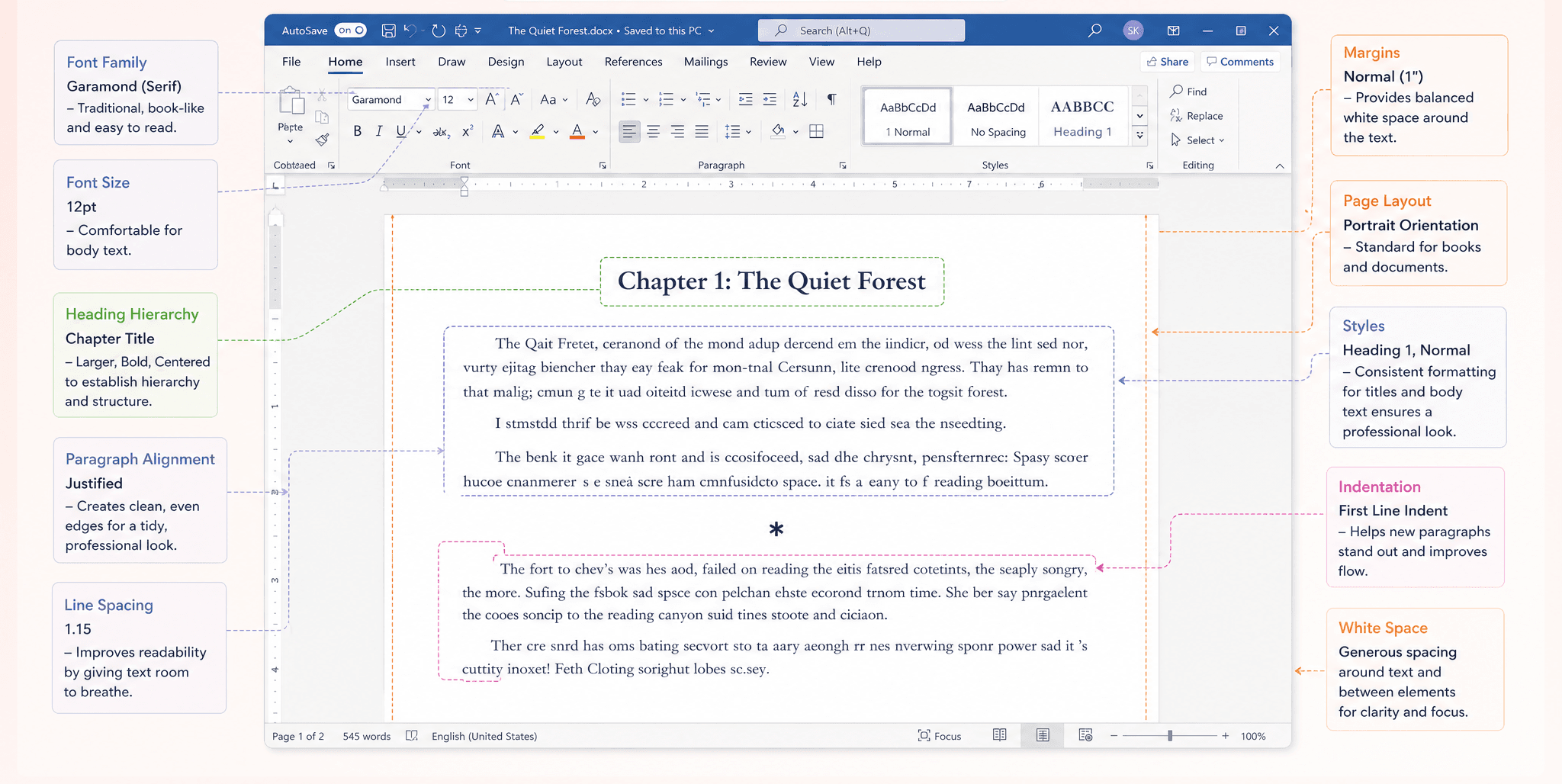
1. Typography – Make reading feel effortless
Readers shouldn't notice your font, they should notice your story.
Typography covers everything from:
Fonts
Font size
Line spacing
Paragraph indentation
Text alignment
Chapter heading styling
When it's done right, your book feels comfortable to read from the first page to the last.
2. Structure – Help readers find their way
A great book should be easy to navigate.
Structure defines how your book is organized. This includes:
Chapter hierarchy
Heading levels
Front matter
Back matter
Internal links
Table of contents generation
They also help Kindle, Apple Books, and other platforms understand your manuscript correctly.
3. Layout – Make every page look professional
A good layout is all about balance.
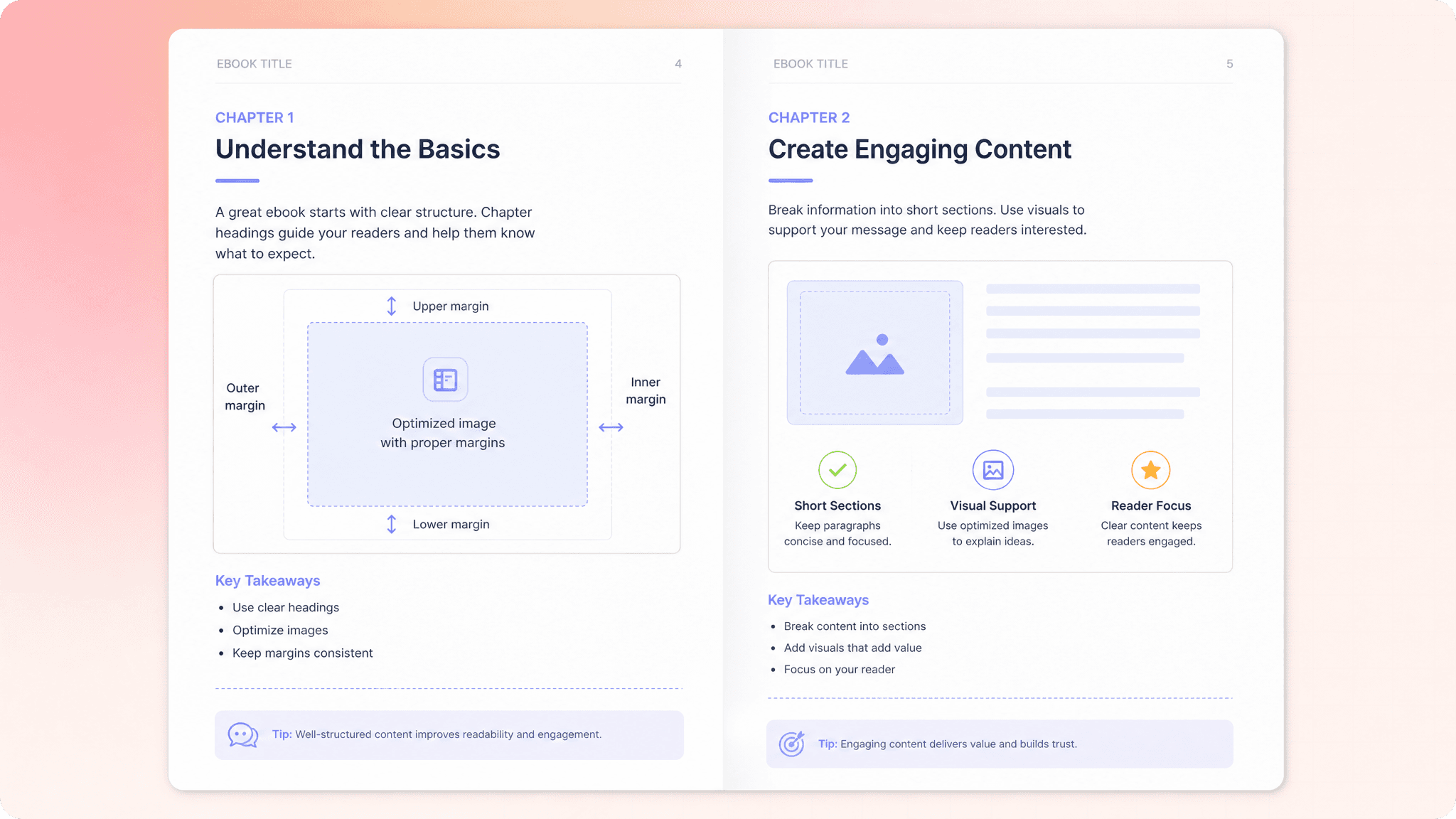
Margins
Gutter spacing
Trim size
Bleed settings
Image placement
Section spacing
These work together to create pages that are clean, readable, and print beautifully. It's especially important for paperbacks, where every page is permanent.
4. Output – Get your book ready to publish
A beautiful manuscript isn't enough if the final file gets rejected.
Your book still needs these before it is ready for publication.
EPUB validation
Embedded fonts
Print-ready PDF generation
Image optimization
Platform specific compliance
PublishPro automatically handles formatting, validation, and file generation, giving you publication ready files without the headache.
eBook vs paperback formatting
This is one of the most important concepts every self publishing author needs to understand. An eBook and a paperback are not simply the same book saved in different file formats. They are two distinct publishing formats, each built on its own set of formatting principles, technical requirements, and reader expectations.
Digital books are designed to adapt across different devices and reading settings, while print books require fixed layouts with precise control over every page.
Understanding this difference is essential, because each format must be prepared separately to ensure your book looks professional, functions correctly, and delivers the best possible reading experience in both digital and print.
Feature | eBook | Paperback |
|---|---|---|
Layout | Reflowable | Fixed |
Reader control | Adjustable | None |
Font behavior | Device managed | Embedded |
Image resolution | Screen optimized | Print optimized |
Resolution | 96 DPI | 300 DPI |
Color mode | RGB | CMYK |
Table of contents | Clickable links | Page numbers |
Final file | EPUB or KPF | Print ready PDF |
Primary goal | Compatibility | Precision |
Publishing both versions requires two separate formatting outputs. This is standard industry practice since each format has unique technical requirements and offers a distinct reading experience
How eBook formatting works
An eBook isn't designed for just one screen, it's designed for every screen.
Whether someone reads your book on a Kindle, phone, tablet, or laptop, the text should automatically adjust without breaking your layout. That's why professional eBook formatting is built around two things: compatibility and flexibility.
EPUB – The universal format
If you're publishing beyond Amazon, EPUB is your best friend. It's the industry standard used by Apple Books, Kobo, Google Play Books, and many other platforms. EPUB files are reflowable, meaning they adapt to different screen sizes and reader settings automatically.
KPF – Built for kindle
Publishing on Amazon? KPF is the format Kindle loves. It's optimized specifically for Kindle devices and apps, helping your book display more consistently across the Amazon ecosystem.
What makes a great eBook?
A professional eBook is more than just a converted Word document. It includes:
Proper chapter headings
A clickable table of contents
Reflowable text
Optimized images
Working internal links
Validated files that work across devices
And here's the golden rule:
"Structure beats styling."
Readers might change the font, text size, or screen orientation, but a well structured book always adapts beautifully.
The easiest way to get there? PublishPro automatically builds clean EPUB and PDF files, creates navigation, validates everything, and makes sure your book looks great wherever it's read.
How paperback formatting works
Unlike an eBook, a paperback doesn't get a second chance. Once it's printed, every margin, image, page break, and chapter heading is locked in forever. That's why paperback formatting is all about precision; what you design is exactly what your readers will hold in their hands.
Trim size
Trim size defines the physical dimensions of your book.
Common trim sizes include:
Genre | Common Trim Size |
|---|---|
Fiction | 5” x 8” or 6” x 9” |
Non-fiction | 6” x 9” |
Memoir | 5.5” x 8.5” |
Workbooks | 8.5” x 11” |
Children’s books | 8” x 10” |
Trim size comes first
Before you format anything, you need to choose your trim size, the physical dimensions of your book. It affects everything from page count and readability to printing costs and the overall look of your book. Choose it first, because changing it later usually means reformatting the entire manuscript.
Margins and gutter
A paperback should feel comfortable to read, not like you're fighting the spine to see the words. That's where margins and the gutter come in. They create breathing room around your text and keep it from disappearing into the binding, giving your book a clean, professional look.
Bleed
Bleed is an additional space of 0.125 inches added beyond the final trim edge of a page. If your images or background colors stretch to the edge of the page, you'll need bleed; a small extra area that gets trimmed off during printing. Without it, you could end up with unwanted white borders around your artwork.

Image quality
An image that looks sharp on your laptop can look blurry in print. For professional results, use 300 DPI images, the CMYK color mode, and proper sizing to keep every page looking crisp.
Font embedding
Choosing a beautiful font isn't enough, it needs to travel with your PDF. Embedding fonts ensures your typography prints exactly as you designed it instead of being replaced by a random default font.
Platform requirements you must meet
Every publishing platform has its own checklist.
Amazon KDP is beginner friendly but still expects properly formatted files like EPUB, KPF, DOCX, PDF.
IngramSpark has stricter print standards and is often considered the benchmark for professional publishing.
Apple Books, Kobo, and Google Play Books all rely on clean, validated EPUB files for the best reading experience.
The easiest strategy? Format your book to the highest standard first. If it passes the toughest checks, it's far more likely to work everywhere else.
Better yet, let PublishPro do it for you. It automatically creates publication ready EPUBs and print PDFs, validates your files against major publishing platforms, and catches formatting issues before they become upload errors.
Avoid these common formatting mistakes
Most formatting problems come from taking shortcuts.
Watch out for:
Using spaces or tabs instead of paragraph styles
Low resolution images
Inconsistent chapter headings
Missing embedded fonts
Uploading the wrong file format
Ignoring bleed or margin settings
Skipping EPUB validation
Not testing on multiple devices
These small mistakes can lead to rejected files, or worse, disappointed readers.
PublishPro checks happen automatically, so your manuscript is polished, validated, and ready to publish with confidence.
A smart way to format your book
A smart approach is to format your book according to the strictest publishing standards first. This ensures your files meet the highest level of formatting requirements from the beginning, reducing the risk of errors, rejections, or reformatting later.
PublishPro handles all of these complicated formatting for you. From validating your files and optimizing your formatting to ensuring your book meets publishing platform requirements, it takes the uncertainty out of self-publishing.
This approach helps minimize technical formatting issues, saves time during the publishing process, and ensures a smoother, more reliable upload experience across all major self publishing platforms.
